
ChatGPT
 Experimental support
ChatGPT support is new and unstable for the moment.
⚠️ The MCP works fine on Thinking mode but not Pro mode. If this is your preferred frontier model, feel free to share any bug reports to help us improve the user experience.
- Go to chatgpt.com
- Click your profile icon → Settings → Apps & Connectors
- Go to Advanced settings → turn on Developer Mode
- Go back to Apps & Connectors → Create app
Configure the app
Section titled “Configure the app”Fill in the following:
| Field | Value |
|---|---|
| Name | Valency |
| Description | Infrastructure for Agentic Science |
| URL | https://labs.valency.io/mcp |
| Auth | OAuth |
Advanced settings
Section titled “Advanced settings”Under the Advanced Tab, configure:
| Field | Value |
|---|---|
| Auth type | User-Defined OAuth Client |
| Client ID | FslW0nVE1JMNobe1wQEsTr7bIwhZTi89 |
| Other fields | Leave as-is |
Complete setup
Section titled “Complete setup”- Check “I trust this application”
- Click Create
- You should see “Valency is Now Connected”
Using Valency in ChatGPT
Section titled “Using Valency in ChatGPT”- Start a new conversation
- In the composer, click the tools menu and enable Valency
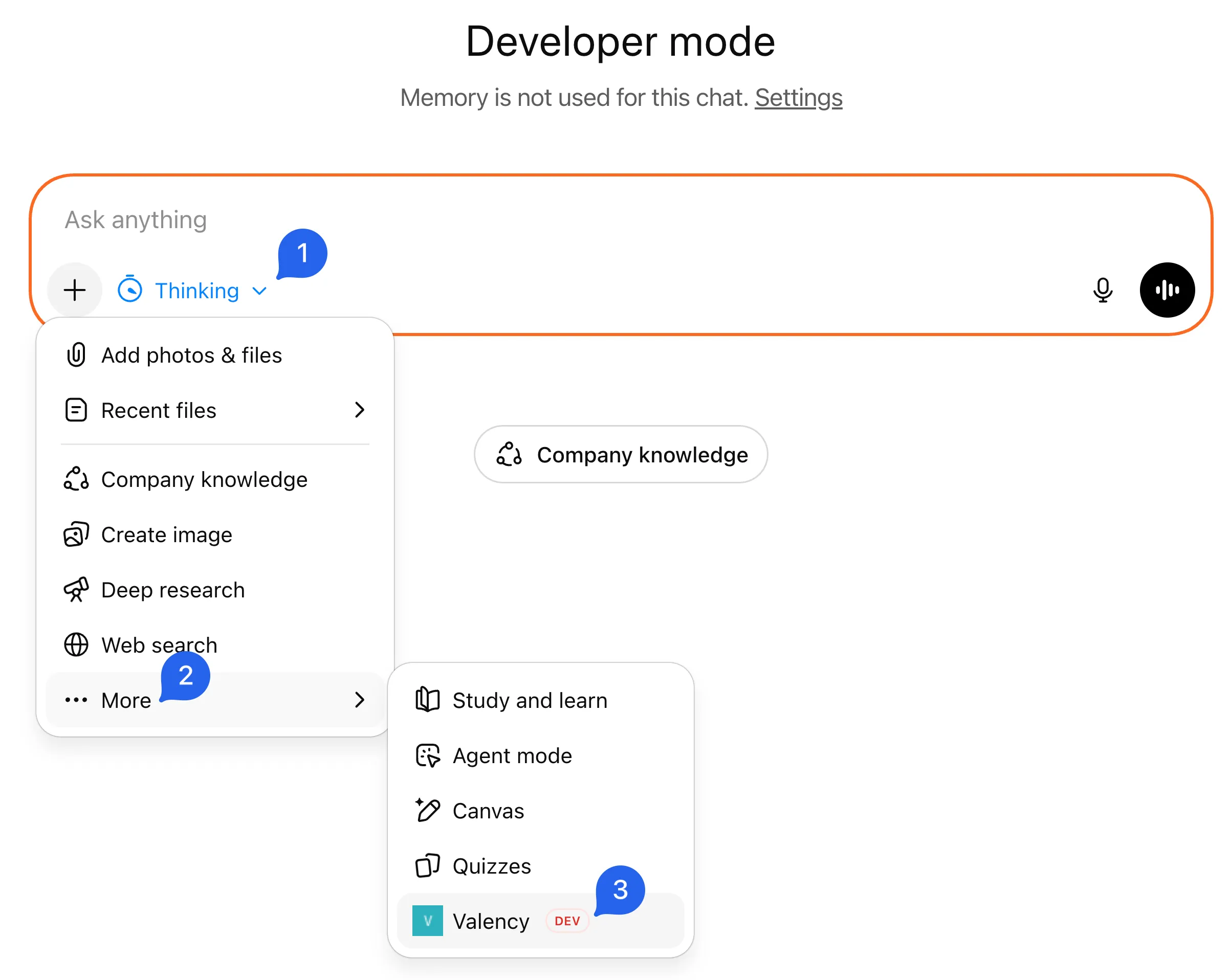
- Ask: “Search for papers about attention mechanisms in transformers”
- You’ll be prompted to authorize — complete the sign-in
Pass: You complete sign-in and see paper results. Fail: Note exactly where it breaks — sign-in, authorization, or tool call.
Troubleshooting
Section titled “Troubleshooting”Can’t find Apps & Connectors?
- Make sure you have a paid ChatGPT subscription (Pro, Plus, Business, or Enterprise)
Tools not appearing?
- Verify Developer Mode is enabled in Advanced settings
- Make sure you’re in Thinking mode, not Instant mode
Authorization fails?
- Check that you’ve signed up at onboard.valency.io/onboard
Need help? Email: labs@valency.io